Golden Clover Casino for iOS
Premium casino gaming designed for iPhone and iPad. Download our iOS app and experience the ultimate mobile gaming with stunning graphics and smooth performance.
Compatible with iOS 12.0 and above | Free Download
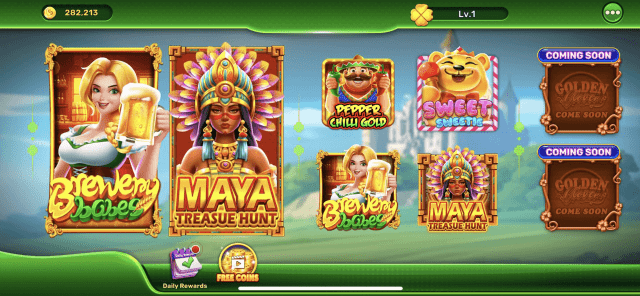
Why Choose Golden Clover iOS App?
Stunning Retina Graphics
Optimized for Retina displays with crystal-clear graphics and vivid colors that bring every game to life.
Seamless Performance
Built specifically for iOS with smooth animations, instant loading, and zero lag for the best gaming experience.
Exclusive iOS Bonuses
Get special bonuses and promotions available exclusively to iOS app users.
Face ID & Touch ID
Quick and secure login with Face ID and Touch ID support for enhanced security and convenience.
Universal App
One app that works perfectly on iPhone, iPad, and iPod Touch with optimized layouts for each device.
Dark Mode Support
Full Dark Mode integration for comfortable gaming in any lighting condition.
Golden Clover iOS App Gallery
Experience premium casino gaming on your iPhone or iPad

Beer Bonanza Mobile

Tusk Your Way to Fortune

Find Your Fortune
How to Install Golden Clover on iOS
Open App Store
Launch the App Store on your iPhone or iPad and search for "Golden Clover Casino".
Download the App
Tap the "Get" or "Download" button. You may need to authenticate with Face ID, Touch ID, or your Apple ID password.
Wait for Installation
The app will automatically download and install on your device. This usually takes just a few seconds.
Start Playing
Open the Golden Clover Casino app, log in or sign up, and start enjoying hundreds of exciting games!
Device Compatibility
Golden Clover Casino works seamlessly across all your Apple devices
iPhone
iPhone 6s and later
- iPhone 15, 14, 13, 12
- iPhone 11, X, XR, XS
- iPhone SE (all generations)
- iPhone 8, 7, 6s
iPad
iPad Air 2 and later
- iPad Pro (all sizes)
- iPad Air (3rd gen and later)
- iPad (5th gen and later)
- iPad mini (4th gen and later)
iPod Touch
iPod Touch (7th gen)
- Full game functionality
- Optimized interface
- Requires iOS 12.0+
- WiFi connection needed
Technical Specifications
Minimum Requirements
- iOS 12.0 or later
- 50 MB free storage
- Internet connection required
- Compatible with iPhone, iPad, iPod
Recommended Specifications
- iOS 15.0 or later
- Stable WiFi or 4G/5G connection
- Latest app version
- iPhone 11 or newer for best experience
iOS Features
- Face ID & Touch ID support
- Dark Mode compatible
- Haptic feedback
- Split View & Slide Over (iPad)
App Highlights
- Universal app for all iOS devices
- Retina display optimized
- Automatic iCloud sync
- Push notification support
Ready for Premium iOS Gaming?
Download Golden Clover Casino for iOS today and experience the best mobile casino gaming on your Apple device!
🔒 App Store verified | Secure download | No hidden costs
Frequently Asked Questions
Is the Golden Clover iOS app available worldwide?
The app is available in most countries through the App Store. Availability may be restricted in certain jurisdictions based on local gambling laws.
Can I play Golden Clover on my iPad?
Yes! Golden Clover Casino is a universal app optimized for both iPhone and iPad, providing an excellent gaming experience on tablets with larger screens.
Will my game progress sync between devices?
Yes, your account information, balance, and progress automatically sync across all devices when you log in with the same account credentials.
Does the iOS app support the latest iPhone models?
The app is fully optimized for the latest iPhone models including iPhone 15, with support for all new features and screen sizes.
How do I enable notifications for bonuses and promotions?
After downloading the app, you'll be prompted to allow notifications. You can also enable them later in your iPhone Settings > Golden Clover > Notifications.
Is the iOS app as good as playing on desktop?
Yes! The iOS app is specifically optimized for mobile devices and offers the same great games, features, and bonuses as the desktop version, plus exclusive mobile perks.